Free Resume & CV QR Code Generator
Connect paper resumes and business cards directly to your digital CV, PDF portfolio, GitHub, or LinkedIn profile with a single camera scan.
Job applicants, freelance designers, software engineers, and university graduates. Print on resume headers and portfolio leave-behinds.
PDF Document Payload
Enter details below to generate vector scannable code
Planning to print on physical standees or packaging?
Pro FeatureAvoid reprint costs. Dynamic QR codes let you change your resume destination URL anytime after printing, plus track real-time customer scan analytics by city and device.
Resume & CV QR Code Generator For Job Seekers
Adding a resume QR code to your printed CV, cover letter, or business card bridges the gap between physical paper and your complete digital career portfolio. When recruiters, hiring managers, or interviewers scan your code, it instantly opens your hosted PDF resume, online portfolio, GitHub repositories, or LinkedIn profile right on their smartphone or tablet.
Multi-Platform Career Routing
Seamlessly link recruiters to your hosted PDF resume, verified LinkedIn profile, active GitHub code repositories, or interactive portfolio with zero scan delay.
Recruiter-Optimized Compact Framing
Choose subtle, corporate-clean frames like "VIEW RESUME", "MY PORTFOLIO", or "LINKEDIN" designed to sit discreetly in standard A4 and US Letter document headers.
Vector SVG for Word, Google Docs & InDesign
Download lossless vector SVG and PDF files that scale with razor-sharp fidelity into Microsoft Word, Canva, LaTeX, and Adobe InDesign layouts.
View Technical Encoding Specifications
https://linkedin.com/in/... or hosted PDF URLHow to add a QR code to your resume or CV
Follow these 4 verified steps in the editor above to configure, style, test, and export your scannable code.
Paste your LinkedIn URL, Google Drive PDF resume link, or online portfolio address
Enter your destination URL, payment details, or text in the editor above.
Choose a clean corporate frame like "View CV" and select subtle professional colors
Select custom corner eyes, dot patterns, brand colors, and add an eye-catching call-to-action frame.
Test-scan the screen preview to verify your digital profile opens quickly without permission errors
Preview the generated matrix on screen and verify reliable optical detection with your smartphone camera.
Export the high-resolution vector SVG or high-resolution PNG and position it cleanly in your resume layout
Download high-resolution vector SVG, PDF, or crisp PNG files ready for screen or commercial print.
Where job seekers deploy resume QR codes
Practical applications across physical checkout counters, corporate collateral, packaging, and commercial displays.
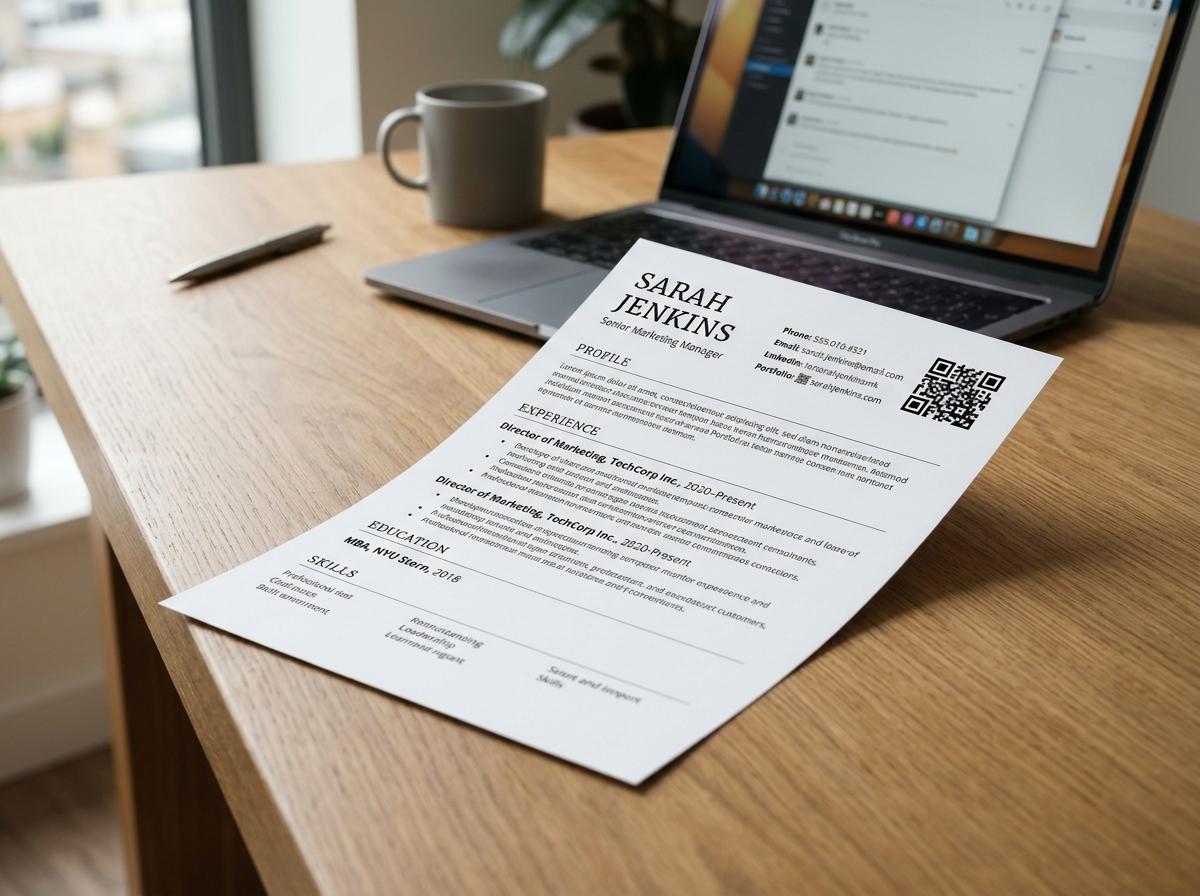
Printed resume headers
Placed in the top contact header linking directly to full digital credentials and certifications.
Personal portfolio business cards
Carried to networking meetups and career fairs for rapid portfolio sharing.
Academic research poster presentations
Embedded on symposium research posters linking to full downloadable papers and datasets.
Creative design leave-behind sheets
Printed on physical leave-behinds linking to high-resolution Figma and Behance case studies.
Software engineering cover letters
Positioned next to candidate contact info linking directly to active GitHub repositories.
Freelancer service rate cards
Attached to rate sheets directing prospective clients to verified testimonials and case studies.
What Recruiters See When Scanning Your Resume QR
Recruiters scan with their smartphone camera to instantly access your hosted PDF resume, verified LinkedIn profile, GitHub code repositories, and creative portfolio — all in one fast-loading, recruiter-friendly mobile hub.
1-tap access to your downloadable PDF CV, recommendations, live code repos, and portfolio.
Launch Mobile View →Static vs. Dynamic QR Codes: Which One Do You Need?
Choose between permanent direct-encoded codes (free forever, zero accounts) and high-speed cloud redirects (update links anytime & track scans).
Static QR Code
Data is written directly inside the QR image. The camera scans it offline with zero servers involved.
- Never ExpiresWorks for life
- No Account RequiredNo sign-up or card
- Works 100% OfflineNo server hops
- High-Res Vector ExportsSVG, PDF & PNG
- Change Link After PrintingNo (Permanently etched)
- Scan Counts & AnalyticsNone (Camera-to-target)
Wi-Fi password signs, personal business cards, shop counter UPI plates, book pages, and permanent physical labels.
Dynamic QR Code
Points to a short link that forwards visitors. You can change where it goes anytime from your screen.
- Change Link After PrintingUpdate link anytime
- Scan Analytics & StatsTotal scans, devices, cities
- Fix Typos Without Re-PrintingZero reprint waste
- High-Res Vector ExportsSVG, PDF & PNG
- Password & Expiry LimitsOptional protection
- Server DependencyGlobal edge cloud redirect
Your resume QR code allows hiring managers to transition from your printed one-page summary to your interactive case studies, design files, or full recommendation letters in seconds with zero manual URL typing.
Frequently Asked Questions About Resume QR Code
Demonstrable facts regarding data encoding standards, printing limits, security, and scanner app compatibility.
Where should I place a QR code on my printed resume?
The top header beside your contact information (near your email and phone number) or the bottom footer is the most professional placement.
What should the QR code on a resume link to?
It can link to your LinkedIn profile, an online portfolio (Behance, GitHub, personal website), a video introduction reel, or a downloadable PDF credential folder.
What size should the QR code be on an A4 resume?
A size of 2.0 cm to 2.5 cm wide (approximately 0.8 to 1.0 inch) is ideal: small enough to look neat and large enough to scan reliably.
Do recruiters actually scan QR codes on resumes?
Yes, especially at career fairs, physical interviews, and design or tech reviews where hiring managers want immediate access to live code or design files on their mobile device.
Is it free to download the QR code for my resume?
Yes. Generating and downloading high-resolution PNG or vector SVG codes with embedro is completely free with unlimited scans and no expiration.
Related QR code generators & technical guides
Discover complementary tools, industry formats, and print specifications for your business.
Ready to Generate Your Resume QR Code?
Create your code now with custom framing, verified high contrast, and vector SVG or high-resolution exports ready for screen or physical print.